As CEO of a software and AI studio that builds client platforms alongside our own products, I hit a wall every founder eventually recognizes: most of my day was disappearing into operational glue. Not architecture, product strategy, or customer conversations, but checking four email inboxes, answering WhatsApp threads, updating leads, hunting down vendor invoices buried in Spam, filing Jira and ClickUp tickets, running manual checks on production, and gathering compliance evidence.
Today my workday looks completely different. Inside Grok Bot, I run a fleet of roughly 20 specialized AI bots that share a common memory layer. I estimate that this setup cuts about 80% of my routine operational busywork. That is a personal estimate, not a measured benchmark. The rule behind the setup is simple: the bots prepare, verify, and orchestrate, while human approval stays in the loop before anything sensitive goes out.
based on my daily workflow
connected by shared memory
with alerts only when it matters
Why I Use Specialized Bots Instead of One Giant Chat
The most common mistake people make with AI assistants is dumping their entire company into one endless chat thread. When you ask the same thread to draft a client email, manage sales leads, inspect cloud infrastructure, chase unpaid invoices, and fix a CSS contrast bug, the context degrades fast and instructions bleed across projects.
Instead of one generalist chat, I split my Grok Bot workspace into roughly 20 narrow specialists: one dedicated bot per client or company we run, plus functional bots for inbox triage, lead management in our custom CRM, live QA, production ops, accounting, collections, compliance, and daily intelligence. Sitting above them is my main Grok Bot acting as Chief of Staff: it runs periodic proactive check-ins several times a day, prepares my meetings, drafts communications, and dispatches coding work to cloud agents. Because the bots share memory, context captured in one workflow is available across the fleet without re-explaining the backstory.
Mixed client context, repeated prompting every morning, noisy instructions, and overly broad tool permissions in a single thread.
One specialist per client or operational role, scoped tool access, and shared memory that preserves context across the entire workspace.
For actions that need my approval, the workflow follows the same sequence:
Bringing Quiet to Four Inboxes, WhatsApp, Our Custom CRM, and My Calendar
The fastest relief came from breaking the habit of checking messages every fifteen minutes. Instead of me polling my inboxes all day, my bots poll them for me.
Hourly Triage Across Four Inboxes That Only Pings When It Matters
A dedicated bot I call my Daily Driver sweeps four separate Gmail accounts every hour throughout the day. Its instruction is strict: stay silent on newsletters, routine receipts, and automated noise, and ping me only when something genuinely requires my attention or decision.
In recent runs, it surfaced an important LinkedIn message I would have missed, an unanswered calendar RSVP, a GitHub pull request waiting for my review, a security alert from the Israeli national cyber authority (CERT), and a teammate's meeting summary. When I finished a consulting session, the same bot created a structured Consultation Hours sheet in Google Sheets and logged the session duration so billable time never slips through at month-end.
Email and WhatsApp Drafts in My Voice
When an alert needs a reply, I do not start from a blank cursor. My main bot reads the thread and drafts the response in my voice - in Hebrew or English, matching how I actually write to that person. That applies to client proposals, partner updates, and even a quick personal WhatsApp note to family when a workday runs late. Crucially, the bot never sends the message on its own: it shows me the draft, waits for my confirmation, and sends only after I approve.
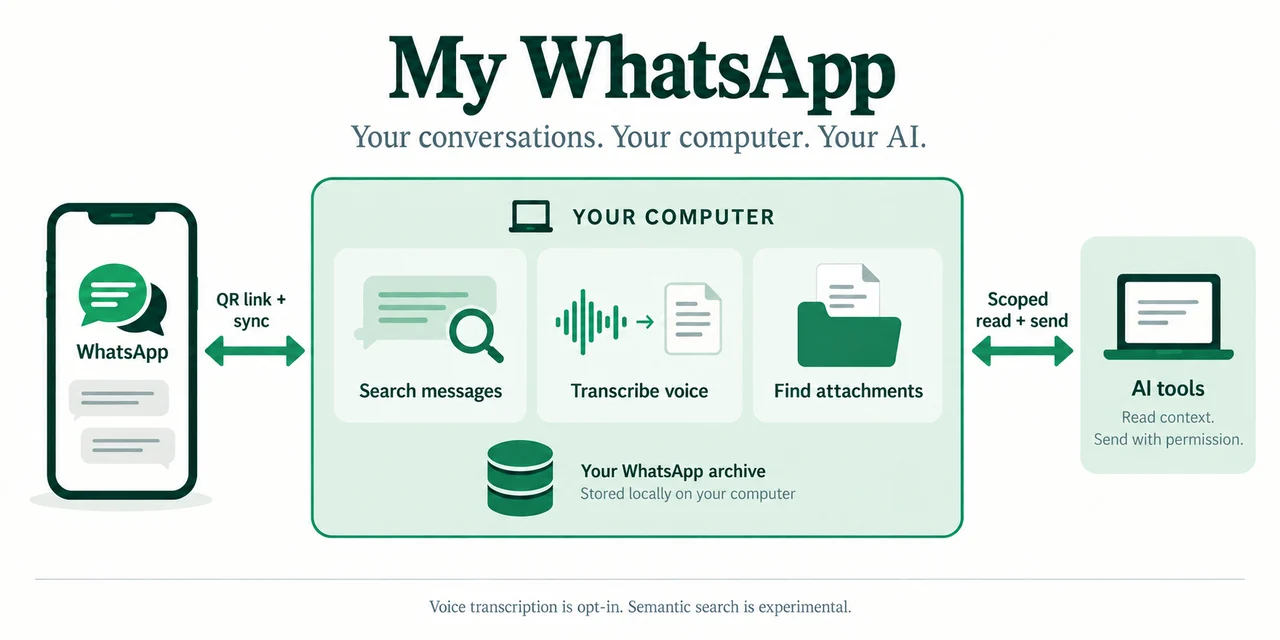
To keep the full WhatsApp archive on my computer and control which results my agents can access, I built and open-sourced my-whatsapp-mcp on GitHub - a completely free, open-source package that keeps a searchable WhatsApp archive on your own computer, transcribes voice notes locally, and exposes scoped, permission-controlled MCP read and send tools to AI agents. I wrote a companion deep-dive on how I built my-whatsapp-mcp and how you can use it for free.
With that bridge in place, a bot reads a permitted business thread, picks out the meeting times a client or partner suggested, checks my availability, and prepares the Google Calendar invites for approval. Calendar access comes from a separate integration.
The local archive is not a promise that nothing leaves my computer: an AI client can share retrieved results with its model provider. The requirement to approve each outgoing message belongs to my agent workflow; the MCP app grants send access per connection and chat.
Custom CRM Lead Management, Meeting Prep Packs, and Follow-Ups
For incoming opportunities and sales pipeline management, I already run a custom CRM for leads connected directly to my agents. When a new lead comes in, the bots enrich the prospect's record inside our custom CRM, track deal context, and make sure follow-ups never slip through the cracks.
Before a key meeting with a prospective client or partner, my Chief of Staff bot compiles a prep pack pulling from our custom CRM, email, and WhatsApp: a background report on the person I am meeting and their company, a summary of our prior threads, and a practical checklist of decisions to cover on the call. Right after the meeting, our custom CRM is updated and raw notes turn into clean follow-up drafts ready for my approval.
From a Chat Message to Merged Code, Live QA, and Accurate Docs
Because DevShift is a digital product and software engineering studio, I wanted my agents wired directly into how we build, test, and maintain production software.
Shipping Production Code Straight From Chat
When I spot a UI issue or want to rework copy on a product page, I drop a screenshot or short prompt into Grok Bot. The bot delegates the coding task to a cloud agent, waits for verification, and hands me a pull request. Recently, a screenshot of a contrast bug on a video popup became a verified, merged PR the same day; another run rewrote an entire product page as a clean PR.
Live Production QA With a Real 1 ILS Checkout
Tests can pass in staging while the live payment flow still fails. My QA Engineer bot runs end-to-end tests on the live production app: it applied a coupon to run a real 1 ILS checkout in production, paused at the payment screen so I could manually enter the credit card details myself, completed the order, and then checked Gmail to confirm the official payment receipt email arrived.
Infrastructure Checks That Fix Stale Documentation on the Spot
Our operations bot inspects live cloud and production configurations to answer architecture questions and compares them against our internal Confluence pages. When it found that an internal engineering page describing our AI pipeline no longer matched the writer-and-critic model setup actually running in production, it updated the Confluence documentation immediately.
Managing Jira and ClickUp Tasks Without Context Switching
Instead of opening heavy project management boards a dozen times a day, I create, update, and triage Jira tickets and ClickUp tasks straight from chat while the conversation is happening.
Back-Office Workflows: Invoices, Collections, ISO Evidence, and Daily Briefs
Back-office operations are the silent tax on every growing company: high-precision tasks that must happen every week, even though no founder started a company to file PDFs by hand.
Invoice Filing (Including Spam), Cloud Spend Dashboards, and WhatsApp Receipts
Every weekday, our accounting bot sweeps our inboxes for vendor invoices and receipts - including checking the Spam folder, where legitimate international SaaS and vendor billing emails frequently land. It files the documents automatically and parses monthly cloud billing PDFs into a clear spend dashboard so we can spot anomalies immediately. It is the exact AI document intelligence workflow we build for clients, running on our own back office.
On the receivables side, a dedicated bot tracks open invoices on a ClickUp collections board. Once a client payment clears, it generates the official receipt and prepares the WhatsApp delivery message to the client for my approval.
ISO Compliance Evidence Filing That Caught an Expired Vendor Certificate
Anyone who has lived through an ISO audit knows the last-minute scramble for screenshots and vendor certificates. Our compliance bot continuously collects and files audit evidence into the right folders week by week. During one routine check, it caught that an external vendor's security certificate had expired - flagging it for renewal long before an auditor ever asked for it.
Daily AI News, Search Console Pulse, and On-Demand Research
To keep me sharp without losing two hours a day to feeds, a news and analytics bot sends me morning and evening AI industry briefs alongside a daily pulse from Google Analytics and Search Console covering traffic and search queries - a lightweight version of the AI business intelligence systems we design for organizations. And when an ad-hoc operational question comes up - from vendor comparisons to finding affordable hourly office space in Hod Hasharon on short notice - an on-demand research run delivers a clear shortlist in minutes.
The Limits: Personal Estimates, Approval, and Permissions
It is easy to oversell AI automation as a "self-driving company." Real production engineering requires clear guardrails, and three rules keep my setup reliable:
I did not run a stopwatch study across every email and ticket. Some days the fleet saves two hours of fragmented admin; other days it saves an entire afternoon of QA, invoice chasing, and PR triage. Saying it cuts roughly 80% of my routine busywork is my honest summary of how much repetitive coordination has disappeared from my plate.
No bot sends an email or WhatsApp message in my name without my explicit approval on the draft. No code merges to production without review. Even in our live 1 ILS checkout test, the bot stopped at the payment form so I could type the card details myself.
As we noted in our analysis of Grok 4.6 and the Grok Bot launch, persistent cloud agents need least-privilege boundaries. I configure tool permissions separately for each bot, so a market-research bot does not receive production or accounting credentials. Separate conversations and shared memory do not enforce that boundary by themselves; the memory layer also needs rules about which client information may be shared.
8 Other Cool Ideas You Can Build With AI Agents
Beyond the workflows already running in my daily setup, other recurring processes can also suit AI agents. These eight ideas are starting points to adapt to your team, data access, and approval rules:
- A consolidated weekly executive digest. One Monday-morning briefing combining action items from email, messaging channels, calendars, finance, and growth metrics instead of scattered notifications.
- Social post drafts generated from shipped work. Turning release notes, merged features, and anonymized project milestones into ready-to-review LinkedIn and X drafts.
- Quiet competitor and market-signal monitoring. Watching industry news, pricing pages, and social feeds for meaningful competitor moves, alerting the team only when something material changes.
- Phone photo receipt capture with automatic VAT split. Snapping a photo of a paper receipt on a phone so an agent extracts the vendor, date, total, and VAT and logs it straight into the expense sheet and cloud storage.
- Meeting recordings to action items and billable hours. Extracting action items from recorded calls directly into project management tickets while logging session durations for monthly billing.
- Automated weekly client status reports. Aggregating completed tickets, code commits, and milestones across each project into a clear weekly progress update draft ready to send.
- A contract, domain, and certificate renewal radar. Tracking expiration dates across vendor agreements, retainers, domains, and security certificates with reminders 30 days ahead of time.
- Candidate screening and interview scheduling. Reviewing incoming applications against role criteria, preparing a structured summary for the hiring manager, and coordinating interview slots once approved.
Frequently Asked Questions About Running an AI Agent Fleet in Grok Bot
Why run 20 separate bots instead of one AI assistant connected to everything?
A single assistant connected to every client and tool suffers from context pollution: rules from one project bleed into another, prompts grow bloated, and permissions become too broad. A specialist bot for each client or function keeps instructions focused. Access stays scoped only when tool permissions and memory-sharing rules are configured accordingly.
How do you control what an AI agent can read and send in WhatsApp?
That exact problem is why I built and released my-whatsapp-mcp as free open-source software. It stores the archive on your computer and limits each connection by chat, optional date bounds, and expiry. Sending needs a separate grant. Once granted, a permitted send call executes directly; my agent workflow adds approval of each draft. Retrieved results can reach the AI client's model provider. Read our full guide on connecting WhatsApp to AI agents with my-whatsapp-mcp.
How much does it cost to build a business AI agent setup like this?
The investment depends on how many systems you integrate and the approval workflows required. For a full breakdown of single-process pilots versus multi-agent systems, see our 2026 AI agent pricing guide and our practical overview of what AI agents can actually do for businesses.
Where should a founder or operations lead start without building 20 bots on day one?
Pick the single daily bottleneck that drains the most focus - such as multi-inbox triage, vendor invoice collection from email and Spam, or connecting leads to your CRM. Launch one bounded agent with human approval, let it prove itself for two weeks, and add specialists one workflow at a time.
Want to build an AI agent workflow that saves real time without giving up control? At DevShift, we architect and ship custom AI agents and business automation systems wired into the tools your team already uses - from Gmail, WhatsApp, and custom CRMs to Jira, ClickUp, accounting, and production QA. Talk to us and let's map the first workflow worth automating in your business.